

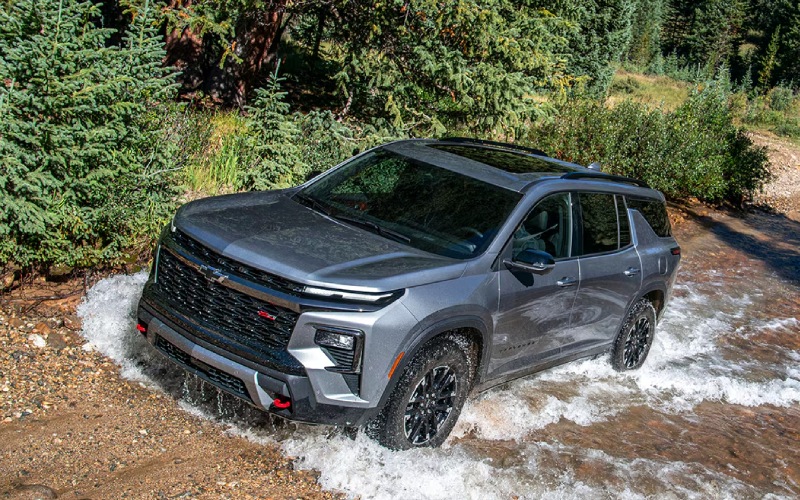
Chevrolet of Corsicana - Tech Made Easy in Kaufman, TX: How the 2026 Chevrolet Traverse Turns Big-Screen Connectivity and Hands-Free Driving into Everyday Confidence
If your day moves between back roads near Kaufman, TX and the I-45 corridor toward Dallas, you quickly learn which SUV tech helps and which tech gets in the way. The 2026 Chevrolet Traverse leans into the former. It brings a standard 17.7-inch diagonal touch-screen, a crisp 11-inch Driver Information Center, Google built-in compatibility, and available Super Cruise hands-free driver assistance technology — not as party tricks, but as tools that make daily driving simpler, calmer, and more consistent.
In this deep dive, we will cover how that big screen earns its keep, why the instrument display is more than just a digital speedometer, and how Super Cruise can lower fatigue across long, straight North Texas stretches. We will also connect those strengths with real-world Kaufman routines — school runs, ballfield drop-offs, and Saturday drives toward Cedar Creek Lake — to help you decide if these features are a must-have or a nice-to-have for your family.
The 17.7-inch Advantage: Clarity You Actually Use
Plenty of vehicles market big screens. Fewer make them truly functional in motion. Traverse’s standard 17.7-inch diagonal touch-screen is arranged so the essentials are right where you want them — mapping on the main canvas, persistent audio controls low and centered, and context tiles that keep settings a tap away. This layout matters on US-175 when you are watching traffic flow while changing destinations or answering the classic “how much longer?” question from the second row.
- Crisp mapping: Large-scale turn prompts and lane-guidance paired with Google Maps
- Persistent controls: Media and climate access remain visible without app-hopping
- Personal profiles: Save layouts and preferences for multiple drivers
- Quick response: Snappy inputs so taps feel immediate, even on bumpy pavement
Because the interface responds quickly and keeps core controls persistent, you spend less time scrolling and more time looking ahead. That is an underrated safety and confidence booster, especially when you are navigating a busy turn lane in Kaufman during school pickup.
11-inch Driver Information Center: Focused and Flexible
The driver-facing 11-inch display is not just about aesthetics. It helps you lean into at-a-glance driving. Cycle configurations to prioritize turn-by-turn directions, driver-assist status views, or streamlined gauges. The payoff is simple — you get the right information without searching or shifting your gaze too far from the road.
- Configurable views: Choose navigation-forward, assist-forward, or classic gauge layouts
- Assist clarity: See when systems like Lane Keep Assist and Following Distance Indicator are active
- Smooth transitions: Modes switch without distracting animations
- Clean typography: Text is easy to read in sun glare common on wide-open Texas highways
That last point matters here. North Texas light can be unforgiving in the late afternoon; a clean, high-contrast cluster means your eyes work less to glean the info you need.
Google Built-In: A Familiar Co-Pilot
Because Google built-in is standard, the Traverse works naturally with voice control and Google services. Say “Hey Google” to navigate, call a contact, or change the cabin temperature. You can also download compatible apps from Google Play, so streaming, podcasts, and even certain productivity tools are along for the ride.
- Voice-first control: Ask for directions, send a text, or find a coffee stop hands-free
- Smart routing: Google Maps suggests alternatives based on live traffic along US-175
- App ecosystem: Extend capability with compatible in-vehicle apps
- Family-friendly: Keep kids’ audio queued up and ready without fuss
When you are juggling practice schedules and dinner runs, voice commands reduce taps and distraction. Over time, that consistency adds up to less stress and fewer moments where you feel a step behind your day.
Super Cruise: Hands-Free Where It Helps Most
Available Super Cruise is not an all-roads, all-conditions tool; it is designed for compatible highways, ideally when you want steady-state cruising. That lines up well with long, straight stretches toward Dallas. Once engaged, Super Cruise allows hands-free driving within its operating domain, while still requiring your attention and readiness to take over. The system’s precise lane centering and gentle inputs make it feel natural rather than intrusive.
- Highway calm: Hands-free driving on compatible stretches helps cut fatigue
- Clear status: Light bar and cluster show system availability at a glance
- Driver focus: Monitoring ensures you remain attentive
- Family flow: Frees mental bandwidth to manage navigation, calls, or cabin needs
Could you live without Super Cruise? Of course. But if weekend trips and regional travel are part of your routine, it is a meaningful upgrade that fits how many Kaufman families drive — long distances in consistent traffic flow.
Everyday Fit: From Car Seats to Cargo
Tech is only great if the rest of the cabin makes sense. Traverse offers available seating for up to eight and Smart Slide Seats that make third-row access genuinely easier, even with a child seat installed on the passenger side. Need to pivot from passengers to cargo? RS and High Country make it almost surprisingly simple with One-Touch Fold second-row and power-folding second- and third-row seating. Add the AutoSense Power Liftgate, and you have fewer steps between you and a loaded trunk.
- Smart access: Smart Slide Seats speed third-row entry and exit
- Power folding: Available one-touch functions reduce heavy lifting
- Hands-free liftgate: AutoSense opens when your hands are full
- Top cargo space: Best-in-class 98 cu. ft. max cargo volume means fewer compromises
Those details translate well in Kaufman — juggling sports gear at the fields, stocking up at big-box stores, or loading a cooler for a quick detour to Cedar Creek Lake.
Frequently Asked Questions:
Is the 17.7-inch screen standard on every 2026 Traverse?
Yes. The large 17.7-inch diagonal color touch-screen is standard across the 2026 Traverse lineup, so you do not have to climb trims to get it.
Do I need the top trim to get Super Cruise?
Super Cruise is available and comes standard as part of the Enhanced Driving Package on RS and High Country. If hands-free capability on compatible roads is a priority, those trims are a great place to start.
How well does the voice control work with real-life use?
With Google built-in, voice commands feel natural. You can ask for directions, adjust climate, or send a message with straightforward prompts, reducing screen taps during busy moments.
Is the tech easy for multiple drivers to share?
Yes. Driver profiles let you save cluster layouts, favorite apps, and interface preferences. Switching between drivers keeps the cabin tech aligned with your habits.
What if I prefer smartphone mirroring over built-in apps?
You can still use your preferred connectivity. The strength of Traverse’s system is that it offers both robust native features and the flexibility to run your go-to services.
Putting it all together, the 2026 Traverse feels like an SUV designed for how Kaufman-area families really move — errand to errand, school to sports, and down long Texas highways with a full crew on board. It pairs human-friendly screen layouts with available hands-free capability on compatible roads, so the technology supports your day rather than complicating it. At the end of a busy week, that can be the difference between arriving drained and arriving ready for what is next.
When you are ready to see how the big-screen interface, driver displays, and hands-free capability work in real time, take a thorough test drive. Try the features you will use most — voice commands for navigation, cluster configurations you find easiest to read, and Super Cruise where the route allows. A few miles are usually enough to feel whether the Traverse’s tech “clicks” with your driving style.
Our team at Chevrolet GMC of Corsicana is here to help you compare trims, explain feature availability, and set up a route that mirrors your daily routine. We are proudly serving Athens, Kaufman, and Hill County with practical guidance that keeps the focus on what matters — matching the right SUV to real life.